If you do cold outreach, you already know how much time it takes to understand a prospect’s business before sending a message. Most people skip this step and that’s why their outreach sounds generic, boring, and gets ignored.
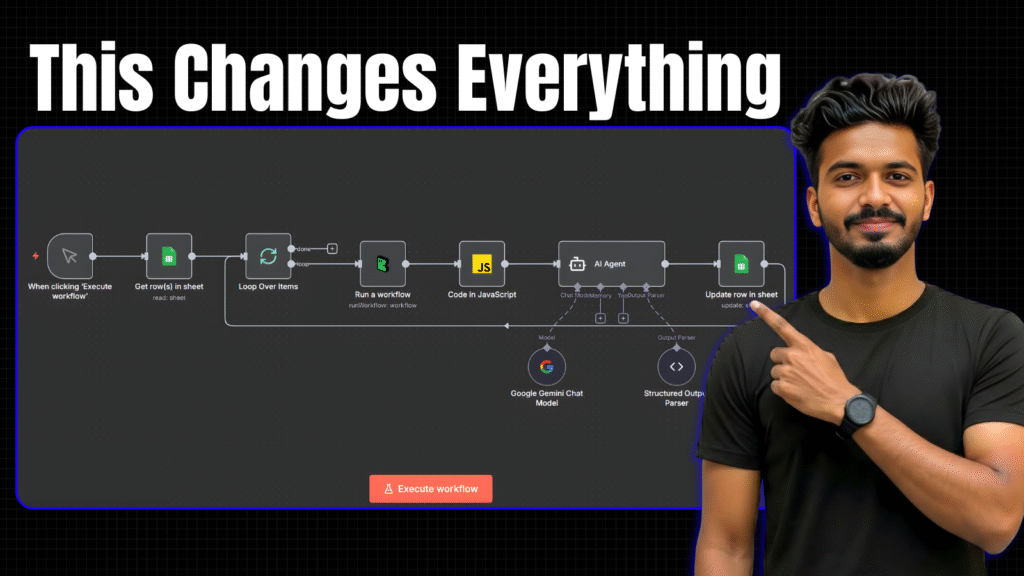
In this tutorial, I’ll share an automated workflow built using n8n, BrowserAct, and AI, which:
- Visits your prospect’s website
- Scrapes the full content
- Cleans the messy text
- Generates a clean business summary
- Stores everything in Google Sheets
- And can be used to write personalised cold outreach messages automatically
Sign up on BrowserAct
You can download the entire workflow JSON and use it instantly.
⬇️ Download Workflow JSONCode Node JavaScript
// Get the original text
let text = $json.output.string;

// Remove markdown-style links: [text](URL)
text = text.replace(/\[([^\]]+)\]\(([^)]+)\)/g, '$1');

// Remove any raw URLs (http, https, tel)
text = text.replace(/https?:\/\/\S+|tel:\S+/g, '');

// Remove iframe URLs
text = text.replace(/IFRAME\s+\S+/g, '');

// Optional: clean repeated spaces or newlines
text = text.replace(/\s{2,}/g, ' ');
text = text.replace(/\n{2,}/g, '\n');

return {
  cleanedText: text.trim()
};
AI Agent System Message
You are an expert to analyze website text and generate a short, clear business summary.

Your task:

1. Read the provided website content.
2. Identify:
   - What the business does
   - Industry and location (if mentioned)
   - Who their customers are (target audience)
   - Their main services, products, or offerings
   - Any unique selling points or claims.

3. Produce a clean summary in simple language.

Output format:

1–3 sentences explaining what the business does, who they serve, and where they operate. A bullet list (5-10 items max) of the main services/products extracted from the content.

Rules:
- Do NOT include links or contact info.
- Do NOT copy long sentences — paraphrase.
- Keep tone neutral and business-professional.
- If information is unclear or missing, skip instead of guessing.